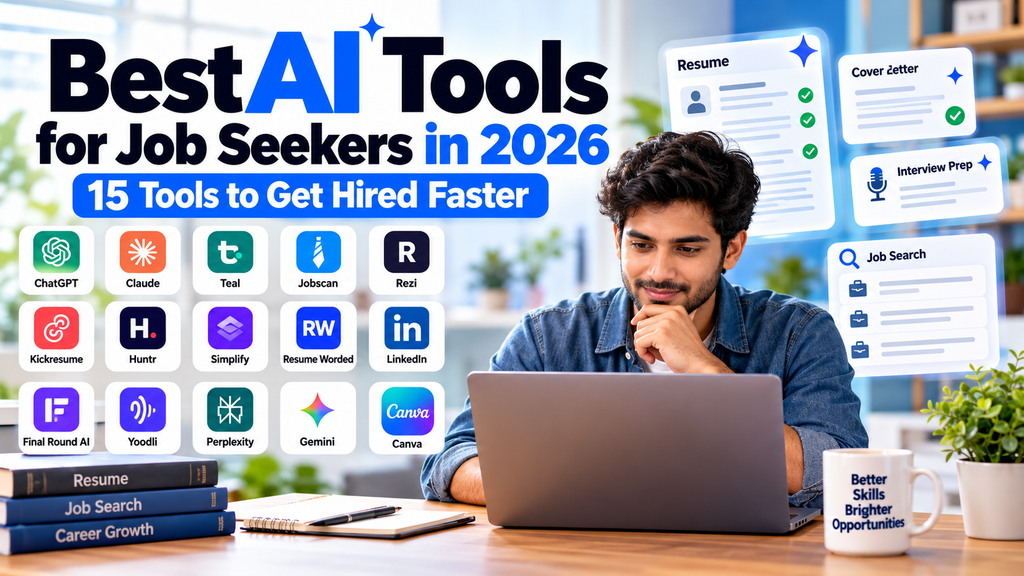
Best AI Tools for Job Seekers in 2026: 15 Tools to Get Hired Faster
Finding a job can be time-consuming. From creating a resume and writing cover letters to searching for suitable positions, preparing for interviews, and tracking applications, the entire process can quickly become overwhelming.
Fortunately, AI tools can make many parts of the job search faster and more organized.
In this guide, we’ll look at the 15 best AI tools for job seekers in 2026 and explain what each tool is best for, how it can help, and who should consider using it.
Quick answer: The best AI tools for job seekers include ChatGPT, Claude, Teal, Jobscan, Rezi, Kickresume, Huntr, Simplify, Resume Worded, LinkedIn, Final Round AI, Yoodli, Perplexity, Google Gemini, and Canva.
Table of Contents
What Can AI Do for Job Seekers?
AI can help with several stages of the job-search process, including:
- Finding relevant job opportunities
- Creating and improving resumes
- Optimizing resumes for ATS systems
- Writing cover letters
- Researching companies
- Preparing for interviews
- Practicing interview answers
- Improving LinkedIn profiles
- Organizing job applications
- Creating professional career documents
However, AI should be used as an assistant rather than a replacement for your own experience and judgment.
Always review AI-generated content before submitting a resume, application, or cover letter.
15 Best AI Tools for Job Seekers in 2026
1. ChatGPT — Best Overall AI Job Search Assistant
ChatGPT can act as a general-purpose career assistant throughout your job search.
You can use it to improve your resume, create cover letters, prepare interview questions, research companies, practice answers, and brainstorm career strategies.
Best uses
- Resume improvement
- Cover letters
- Interview preparation
- Job-search strategies
- Career planning
- Job description analysis
- Professional writing
Why use it?
The biggest advantage is flexibility. Instead of using it for only one part of the job search, you can use ChatGPT throughout the entire process.
For example, you can provide a job description and ask AI to identify the important skills and keywords, then use those insights to improve your application.
Best for: Almost every stage of the job search.
2. Claude — Best for Detailed Resume and Application Writing
Claude is another powerful AI assistant that can be useful for job seekers who need help working with longer documents.
It can analyze resumes, job descriptions, cover letters, and other career-related material and help improve clarity and structure.
Best uses
- Resume editing
- Cover letters
- Application responses
- Long job descriptions
- Professional communication
- Career brainstorming
Why use it?
Claude can be particularly useful when you want detailed feedback rather than simple rewriting.
Best for: Detailed career-document analysis and writing.
3. Teal — Best for Job Tracking and Resume Management
Ready to organize your job search?
If you’re applying to multiple positions, a dedicated job-search platform can save hours of manual tracking. Try Teal and see how it can help you organize jobs, tailor your resume, and keep your applications under control.
Teal is designed specifically around the job-search process.
It can help job seekers organize applications, manage job-search information, and create targeted resumes.
Instead of keeping job listings and application information scattered across different documents, you can use a dedicated job-search workflow.
Best uses
- Job tracking
- Resume management
- Job matching
- Application organization
- Career planning
Why use it?
A structured job-search system can make it easier to keep track of applications and follow-ups.
Best for: Job seekers applying to multiple positions.
4. Jobscan — Best for ATS Optimization
Want to give your resume a better chance with ATS systems?
Try Jobscan to compare your resume with a specific job description and identify important keywords and areas for improvement before you apply.
Many companies use Applicant Tracking Systems, commonly called ATS, to process resumes before recruiters review them.
Jobscan focuses on helping job seekers compare their resumes with job descriptions and identify areas that may need improvement.
Best uses
- ATS optimization
- Resume keyword analysis
- Job-description comparison
- Resume improvement
Why use it?
A resume can be well written but still fail to communicate relevant skills clearly enough for a particular position.
Jobscan can help identify important keywords and skills that should be considered when tailoring a resume.
Best for: Job seekers applying to ATS-heavy recruitment processes.
5. Rezi — Best AI Resume Builder
Need a new resume?
If you’re starting from scratch, try Rezi to create an AI-assisted resume and tailor it toward the type of position you’re targeting.
Rezi focuses on creating and optimizing resumes with AI-assisted features.
It can help structure resume content and tailor applications toward specific job opportunities.
Best uses
- Resume creation
- Resume optimization
- ATS-focused resumes
- Resume formatting
Why use it?
Creating a resume from scratch can be difficult, especially if you’re unsure how to describe your experience.
An AI resume builder can provide a structured starting point.
Best for: People creating or rebuilding their resume.
6. Kickresume — Best for Creating Career Documents
Kickresume provides tools for creating resumes and other job-search documents.
Its AI features can help generate and improve content while its templates can make documents look more polished.
Best uses
- Resume creation
- Cover letters
- Resume templates
- Career documents
Why use it?
It combines AI assistance with ready-made templates, making it useful for people who want both writing help and visual structure.
Best for: Job seekers who want an attractive, professionally structured resume.
7. Huntr — Best for Organizing Job Applications
Applying for multiple jobs can quickly become difficult to manage.
Huntr is designed to help job seekers organize their applications and keep important information in one place.
Best uses
- Application tracking
- Job organization
- Resume management
- Job-search planning
Why use it?
Instead of relying on spreadsheets or browser bookmarks, a dedicated job-search tracker can make your application process easier to manage.
Best for: Active job seekers managing many applications.
8. Simplify — Best for Streamlining Applications
Simplify focuses on making the job application process easier.
It can help users discover opportunities and reduce some of the repetitive work involved in applying for jobs.
Best uses
- Job discovery
- Application assistance
- Job tracking
- Repetitive application tasks
Why use it?
Job applications can involve repeatedly entering similar information. Tools designed around application workflows can help reduce this friction.
Best for: People applying to many positions.
9. Resume Worded — Best for Resume Feedback
Resume Worded focuses on providing feedback on resumes and LinkedIn profiles.
It can help identify areas where your resume could communicate your experience more effectively.
Best uses
- Resume feedback
- LinkedIn profile improvement
- Resume scoring
- Professional writing
Why use it?
Sometimes the problem isn’t your experience but how that experience is presented.
Feedback tools can help identify weak descriptions, unclear achievements, and opportunities to make your resume more compelling.
Best for: Job seekers who already have a resume but want to improve it.
10. LinkedIn — Best for Networking and Job Discovery
LinkedIn remains one of the most important platforms for professional networking and job discovery.
Its AI-powered features can assist users with aspects of job searching, profile improvement, and professional content.
Best uses
- Finding jobs
- Networking
- Building a professional profile
- Researching companies
- Connecting with recruiters
Why use it?
Not every job opportunity is found through traditional job boards.
Networking can uncover opportunities that may not be obvious from a standard job search.
Best for: Almost every professional job seeker.
11. Final Round AI — Best for Interview Preparation
Getting an interview is only part of the process. You also need to perform well during the interview.
AI interview tools can help candidates practice responses and prepare for common interview scenarios.
Final Round AI is designed around interview preparation and can help candidates prepare for different interview situations.
Best uses
- Interview preparation
- Practice questions
- Interview strategy
- Career coaching
Why use it?
Practicing before an interview can help you become more comfortable explaining your experience and answering common questions.
Best for: Candidates preparing for important interviews.
12. Yoodli — Best for Communication Practice
Yoodli focuses on communication practice and can be useful for people who want to improve how they speak during interviews, presentations, and professional conversations.
Best uses
- Interview practice
- Speaking practice
- Presentation preparation
- Communication improvement
Why use it?
Knowing what to say is only part of an interview.
How you communicate your answer can also influence how effectively your experience comes across.
Best for: Candidates who want to improve their communication skills.
13. Perplexity — Best for Company and Career Research
Before applying for a position, researching the company can give you valuable context.
Perplexity can help you research companies, industries, competitors, technologies, and current developments.
Best uses
- Company research
- Industry research
- Interview preparation
- Career research
- Finding information quickly
Why use it?
Good research can help you ask better questions during an interview and demonstrate that you understand the company.
Best for: Candidates preparing for interviews and researching employers.
14. Google Gemini — Best for Google-Based Career Workflows
Google Gemini can help with writing, brainstorming, research, summarization, and other career-related tasks.
For people already using Google’s ecosystem, Gemini can fit naturally into their existing workflow.
Best uses
- Resume writing
- Cover letters
- Research
- Brainstorming
- Professional writing
Why use it?
If your job-search workflow already involves Google’s productivity tools, Gemini can be a convenient AI assistant.
Best for: Job seekers already using Google’s ecosystem.
15. Canva — Best for Resume Design
Canva is widely known for graphic design, but it can also be useful when creating resumes, presentations, portfolios, and other professional materials.
Best uses
- Resume design
- Portfolio creation
- Presentation design
- Career documents
- Personal branding
Why use it?
A clean and professional visual presentation can help your application materials look polished.
However, avoid overly complicated resume designs if you’re applying through an ATS. A simple, readable format is often safer.
Best for: Candidates who want to improve the visual presentation of their career documents.
Best AI Tools for Job Seekers by Category
| Job Search Task | Recommended Tool |
|---|---|
| Overall AI assistant | ChatGPT |
| Detailed writing | Claude |
| Job tracking | Teal |
| ATS optimization | Jobscan |
| AI resume building | Rezi |
| Resume and cover letters | Kickresume |
| Application organization | Huntr |
| Application assistance | Simplify |
| Resume feedback | Resume Worded |
| Networking and jobs | |
| Interview preparation | Final Round AI |
| Communication practice | Yoodli |
| Company research | Perplexity |
| Google-based workflows | Gemini |
| Resume design | Canva |
Best AI Job Search Toolkit
You don’t need to use all 15 tools.
A simple combination can be more effective.
For beginners
ChatGPT + LinkedIn + Canva
Use ChatGPT for writing and preparation, LinkedIn for finding opportunities and networking, and Canva for professional career documents.
For serious job seekers
ChatGPT + Teal + Jobscan + LinkedIn
This combination covers writing, organization, ATS optimization, networking, and job discovery.
For interview preparation
ChatGPT + Final Round AI + Yoodli
Use AI to research the company, practice questions, and improve your communication.
For creating a resume
ChatGPT + Jobscan + Rezi
Use AI to create the initial content, optimize it for the position, and build a structured resume.
How to Use AI to Improve Your Resume
One of the best ways to use AI is to tailor your resume for each important job application.
Instead of sending exactly the same resume to every employer:
- Read the job description.
- Identify the most important skills.
- Compare those requirements with your experience.
- Rewrite relevant bullet points using accurate information.
- Check the resume for clarity and ATS compatibility.
- Review everything manually before submitting.
Example prompt
You can give an AI assistant your resume and the job description and ask:
Analyze this job description and my resume. Identify the most important skills and requirements, then suggest improvements to my resume using only information that is actually supported by my experience.
This is much safer than asking AI to invent experience that you don’t have.
How to Use AI for Cover Letters
AI can help create a starting point for a cover letter.
However, avoid sending generic AI-generated letters without editing them.
A better approach is to provide:
- The job description
- Your relevant experience
- Your achievements
- Why you are interested in the company
- The specific role
Then ask AI to create a concise draft that you can personalize.
How to Use AI for Interview Preparation
AI can simulate an interviewer and help you practice.
Ask it to:
- Act as the hiring manager
- Ask one question at a time
- Wait for your answer
- Critique your response
- Suggest improvements
- Ask follow-up questions
You can also provide the job description and ask for questions specifically related to the role.
This makes practice more relevant than simply memorizing generic interview questions.
Can AI Guarantee a Job?
No.
AI can improve your workflow, but it cannot guarantee that you will get hired.
Hiring decisions depend on many factors, including:
- Your skills
- Experience
- Qualifications
- Interview performance
- Competition
- Company requirements
- Communication
- Culture and role fit
The goal of AI should be to help you present your genuine qualifications more effectively, not to misrepresent your background.
Should You Let AI Write Your Entire Resume?
Not completely.
AI is useful for improving wording, structure, clarity, and organization.
But your resume should remain based on your actual:
- Experience
- Skills
- Education
- Achievements
- Responsibilities
- Projects
Never allow an AI tool to invent qualifications, employment history, certifications, or achievements.
Are AI Resume Builders Worth Using?
They can be useful if you’re struggling to create a resume from scratch.
However, an AI-generated resume isn’t automatically a good resume.
Always check:
- Accuracy
- Formatting
- Keywords
- Readability
- Relevance to the job
- Factual correctness
The best resume is not necessarily the one with the most AI-generated content. It’s the one that clearly communicates why you’re qualified for the position.
Final Verdict
The best AI tools for job seekers in 2026 depend on which part of the job search you want to improve.
For an all-around AI assistant, ChatGPT is an excellent starting point.
For job organization, consider Teal or Huntr.
For ATS optimization, Jobscan can be useful.
For resume creation, Rezi or Kickresume are worth exploring.
For interview preparation, Final Round AI and Yoodli can help you practice.
And for finding opportunities and networking, LinkedIn remains essential.
The smartest approach isn’t to use every AI tool available. Instead, choose a small toolkit that solves your specific problems and combine it with your own judgment and experience.
Frequently Asked Questions
What is the best AI tool for job seekers?
ChatGPT is one of the most versatile options because it can help with resumes, cover letters, interview preparation, research, and career planning. Specialized tools can be better for specific tasks such as ATS optimization or application tracking.
Can AI help me find a job?
Yes. AI can help you discover opportunities, analyze job descriptions, tailor resumes, prepare applications, research companies, and practice interviews. However, it cannot guarantee employment.
What is the best AI resume builder?
Rezi and Kickresume are two options worth considering for AI-assisted resume creation. The best choice depends on the type of resume you need and how much customization you want.
Can AI optimize my resume for ATS?
Yes. Tools such as Jobscan are designed to help compare resumes with job descriptions and identify relevant keywords and skills.
Can AI write a cover letter?
Yes. AI assistants can create cover-letter drafts based on your experience and a job description. You should always review and personalize the final version.
Can AI help with interview preparation?
Yes. AI can generate interview questions, simulate interviews, critique answers, and help you prepare for specific roles.
Should I use AI for every job application?
Not necessarily. AI is most useful when it saves time while still allowing you to personalize important applications. Focus your effort on roles that are a strong match for your skills and experience.
Is it okay to use AI when applying for jobs?
Generally, AI can be used as a productivity and writing assistant, but candidates should follow the employer’s instructions and avoid misrepresenting their skills or experience.
Final Tip
Don’t use AI to pretend to be a better candidate.
Use AI to be a better-prepared candidate.
The strongest job-search workflow combines AI efficiency with genuine experience, personalized applications, networking, and good interview preparation.
Disclosure: Some links or recommendations on this website may be affiliate links, meaning Mind of He may earn a commission if you make a purchase through them, at no additional cost to you.