Best Wireless Keyboards and Mice for Home Office in 2026
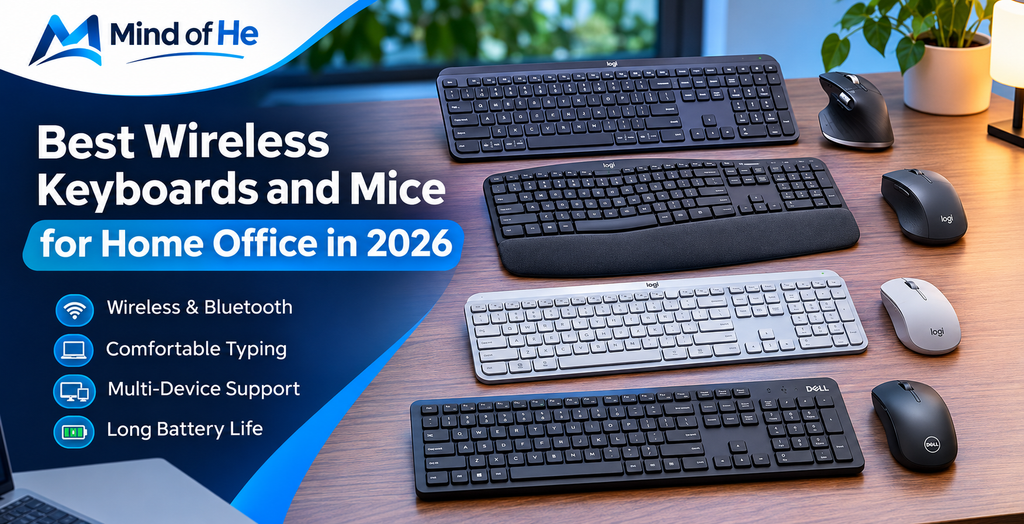
A comfortable keyboard and mouse can make a significant difference to your everyday home office experience. Whether you work remotely, manage spreadsheets, write documents, or spend hours switching between applications, the right wireless combination can help create a cleaner and more productive workspace.
Wireless keyboard and mouse combos reduce cable clutter and often allow you to connect both devices using a single receiver. Some models also support Bluetooth, multiple computers, customizable shortcuts, and ergonomic designs.
In this guide, we compare four of the best wireless keyboard and mouse combos in 2026 from Logitech and Dell. We cover premium productivity features, typing comfort, multi-device connectivity, and budget-friendly options.
Choosing the best wireless keyboard and mouse combos can improve typing comfort, reduce desk clutter and make everyday home office work more convenient.
Best Wireless Keyboard and Mouse Combos in 2026
Table of Contents
1. Logitech MX Keys S Combo – Best Premium Productivity Setup
The Logitech MX Keys S Combo is designed for professionals who want a premium keyboard and mouse setup for everyday productivity.
The combination includes the MX Keys S keyboard and MX Master 3S mouse. The keyboard offers low-profile keys, smart backlighting, and a full-size layout. The MX Master 3S mouse adds precision tracking, customizable buttons, and a MagSpeed scroll wheel.
This combination is particularly useful for people who work with documents, spreadsheets, creative applications, and multiple everyday productivity tools.
Key features:
- Premium wireless keyboard and mouse combination
- Low-profile keyboard with smart backlighting
- MX Master 3S precision mouse
- Bluetooth and Logi Bolt receiver connectivity
- Customizable controls through Logi Options+
- Designed for Windows and macOS workflows
Pros:
- Excellent productivity-focused design
- Comfortable low-profile typing experience
- Advanced mouse scrolling and customization
- Suitable for demanding daily computer use
Cons:
- Premium price compared with basic combos
- May offer more features than casual users need
- Check the exact bundle contents before buying
Who should buy it?
Choose the MX Keys S Combo if you spend several hours working at a computer and want advanced keyboard and mouse features for productivity.
Check Price on Amazon2. Logitech MK850 Performance – Best for Typing Comfort
The Logitech MK850 Performance is a full-size wireless keyboard and mouse combo designed around comfort and multi-device productivity.
Its keyboard features a cushioned palm rest, curved keyframe, and carefully shaped keys. The included mouse has a contoured design intended to fit comfortably in the hand.
One useful feature is the ability to switch between multiple connected devices. This can help people who regularly work across a laptop, desktop, or compatible mobile device.
Key features:
- Full-size wireless keyboard with numeric keypad
- Cushioned palm rest
- Contoured wireless mouse
- Bluetooth and Logitech Unifying receiver connectivity
- Easy-Switch support for up to three devices
- Manufacturer-rated battery life of up to 36 months for the keyboard and 24 months for the mouse
Pros:
- Comfortable full-size keyboard layout
- Useful palm rest
- Multi-device switching
- Suitable for long office sessions
Cons:
- Larger desk footprint
- Traditional design may not suit everyone
- Check receiver compatibility before buying
Who should buy it?
The MK850 is worth considering if you prefer a full-size keyboard, a cushioned palm rest, and the convenience of switching between multiple computers.
Check Price on Amazon3. Logitech Signature Slim Combo MK950 – Best Modern Office Combo
The Logitech Signature Slim Combo MK950 is designed for modern workspaces where users want a slim keyboard, a comfortable mouse, and the ability to move between different computers.
The keyboard uses a low-profile, laptop-style typing design. The included mouse provides a contoured shape and fast scrolling features.
The combo supports Bluetooth Low Energy and a Logi Bolt USB receiver. It also supports multi-device workflows, making it useful for people who separate personal and professional computers.
Key features:
- Slim full-size wireless keyboard
- Laptop-style typing experience
- Contoured wireless mouse
- Bluetooth and Logi Bolt connectivity
- Multi-device switching
- Customizable controls with Logi Options+
Pros:
- Modern, slim appearance
- Comfortable laptop-style keys
- Convenient multi-device workflow
- Suitable for home and office desks
Cons:
- Not a mechanical keyboard
- Some customization features require additional software
- Check the exact regional bundle and compatibility
Who should buy it?
Consider the MK950 if you want a clean-looking desk setup and regularly switch between a work laptop and a personal computer.
Check Price on Amazon4. Dell Pro KM5221W – Best Budget Office Combo
The Dell Pro KM5221W is a practical wireless keyboard and mouse combo for users who want a straightforward office setup without paying for premium productivity features.
It uses a 2.4GHz wireless USB receiver and includes a full-size keyboard with a numeric keypad and a compact optical mouse.
Dell advertises battery life of up to 36 months under specified usage conditions. The combination also includes programmable keyboard shortcuts and security features designed for business environments.
Key features:
- Full-size wireless keyboard
- Optical wireless mouse
- 2.4GHz USB receiver
- Dedicated numeric keypad
- Programmable shortcut keys
- Manufacturer-rated battery life of up to 36 months
Pros:
- Straightforward office functionality
- Full-size layout
- Long advertised battery life
- Useful for everyday typing and office tasks
Cons:
- No Bluetooth connectivity
- Requires a USB receiver
- Fewer premium customization options
Who should buy it?
The Dell KM5221W is a suitable choice for everyday office work, including documents, spreadsheets, email, and general computer use.
Check Price on AmazonWireless Keyboard and Mouse Comparison Table
| Product | Best For | Amazon |
|---|---|---|
| Logitech MX Keys S Combo | Premium productivity | Check Price |
| Logitech MK850 Performance | Typing comfort | Check Price |
| Logitech Signature Slim Combo MK950 | Modern office setup | Check Price |
| Dell Pro KM5221W | Budget office setup | Check Price |
Use the comparison table below to understand the main differences between these four options.
How to Choose the Best Wireless Keyboard and Mouse Combo
Before buying a wireless keyboard and mouse combo, consider these important factors.
Before buying, check the manufacturer’s official specifications for supported connections, compatibility and battery life. You can explore Logitech’s official website for product details and support information.
1. Wireless Connectivity
Wireless combinations generally use Bluetooth or a dedicated USB receiver.
Bluetooth is convenient if you want to avoid using a USB port. A dedicated receiver can provide a simple connection, particularly for desktop computers.
Some products support both options, giving you more flexibility.
2. Keyboard Layout and Typing Comfort
Choose a keyboard that matches your working habits.
A full-size keyboard with a numeric keypad can be useful for accounting, spreadsheets, and data entry. A slim keyboard may be better if you prefer a laptop-style typing experience.
If you type for several hours daily, consider key shape, palm support, keyboard angle, and overall layout.
3. Mouse Comfort
Mouse size and shape matter because everyone has different hand sizes and grip preferences.
Consider the mouse’s shape, button placement, scroll wheel, sensor performance, and weight before purchasing.
4. Battery Life
Battery life varies between models and depends on usage.
Rechargeable models offer convenience, while replaceable-battery models can be useful if you prefer not to wait for charging.
Always check the manufacturer’s stated battery estimates and conditions.
5. Operating System Compatibility
Check whether the keyboard and mouse support your computer’s operating system.
Also check whether optional customization software is available for your device. Basic functions may work even when advanced customization features are unavailable.
Still choosing the right computer setup? Use our Laptop Finder to explore laptop options based on your budget, performance needs and everyday work requirements.
Wireless vs Wired Keyboard and Mouse: Which Is Better?
Wireless keyboard and mouse combos help reduce desk clutter and provide flexibility when arranging your workspace.
Wired devices do not require batteries or wireless pairing and may be preferable for users who want a simple permanent connection.
For most home office users, a reliable wireless combination offers a convenient balance of flexibility and everyday productivity.
Common Buying Mistakes to Avoid
- Buying a keyboard with the wrong regional layout.
- Ignoring Bluetooth and USB receiver compatibility.
- Choosing a mouse that does not fit comfortably.
- Assuming all wireless combos are rechargeable.
- Paying for premium features you will rarely use.
- Ignoring operating system compatibility.
Frequently Asked Questions
Are wireless keyboard and mouse combos good for office work?
Yes. They offer convenient connectivity, reduce cable clutter, and provide a practical setup for everyday office tasks.
Is Bluetooth better than a USB receiver?
Neither is universally better. Bluetooth saves a USB port, while a dedicated receiver provides a straightforward connection. Choose according to your computer and preferences.
Do wireless keyboard and mouse combos need batteries?
Most models use either replaceable batteries or rechargeable batteries. Check the exact product specifications before purchasing.
Can I use a wireless keyboard and mouse with two computers?
Some models support switching between multiple connected devices. Check the manufacturer’s specifications for the number of supported devices.
Which keyboard and mouse combo is best for long working hours?
Look for comfortable key design, appropriate keyboard height, a suitable mouse shape, and a layout that fits your work habits. The Logitech MK850 is one option to consider because it includes a cushioned palm rest.
Final Thoughts
The best wireless keyboard and mouse combo depends on your budget, workspace, typing habits, and connectivity requirements.
The Logitech MX Keys S Combo is aimed at premium productivity users. The MK850 prioritizes typing comfort, while the Signature Slim MK950 offers a modern multi-device setup. The Dell Pro KM5221W is a practical option for straightforward office work.
Before purchasing, compare the exact model, keyboard layout, connection type, warranty, and compatibility with your computer.
Choose a combination that makes your everyday work more comfortable and keeps your home office organized.
The best wireless keyboard and mouse combos depend on your typing habits, preferred features, budget and daily workload.